GlobalERPfy customer portal
01
What is GlobalERPfy
Your Centralized Document Management Workspace
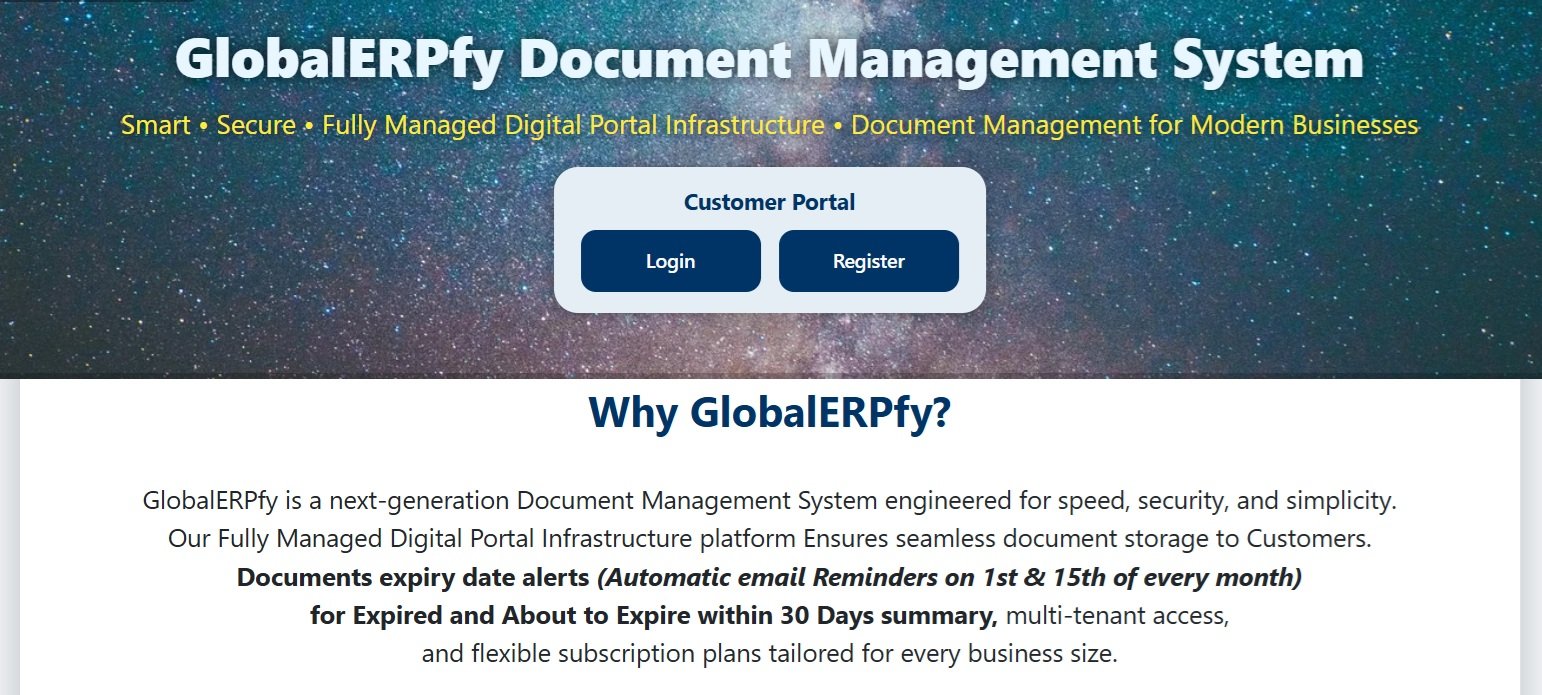
GlobalERPfy Document Management System is specially designed for sending Auto-Reminder to the Customer's Registered email for their documents expiry and about to expiry status.
How it Works
  1. Documents about to expiry in 30 days including already expired will be emailed.
  2. The email frequency on 1st and 15th of every Month until the customer's Subscription Validity.
  3. This will support customer to make planning for renewal of the documents before it gets expire.
✓ Your Benefit
  • No need a dedicated person / secretary for Reminding.
  • Customer can Renew before the document gets exipire.
  • No Forgotting, No Penaulty, No Tension...
GlobalERPfy document upload
02
Register/Login GlobalERPfy
Register & Login to Benefit the GlobalERPfy Features
From Home page Click on Register for endrolling new customer, for existing customers click on Login with your credentials in GloablERPfy Document Management System.
GloablERPfy Stands for:
  1. Creating & Updating your Documents with the Subscription Limit
  2. All documents will be recorded under Document type. like: Passport, Driving License etc.
  3. The pre-existing Document Types are Driving License & Passport, Customer can create document type of their own based on their requirements.
  4. Documents & Doument Types limit based on Subscription Package.
✓ Your Benefit
  • Specialized Dashbord with Listing your reminders for the documents expiring in 30 days & expired.
  • You can create Documents & Types based on your requirement.
  • Update Document Expiry Details at any time.
  • Automatic Email Reminder on 1st and 15th of every month until the subscription validity period.
GlobalERPfy document management
03
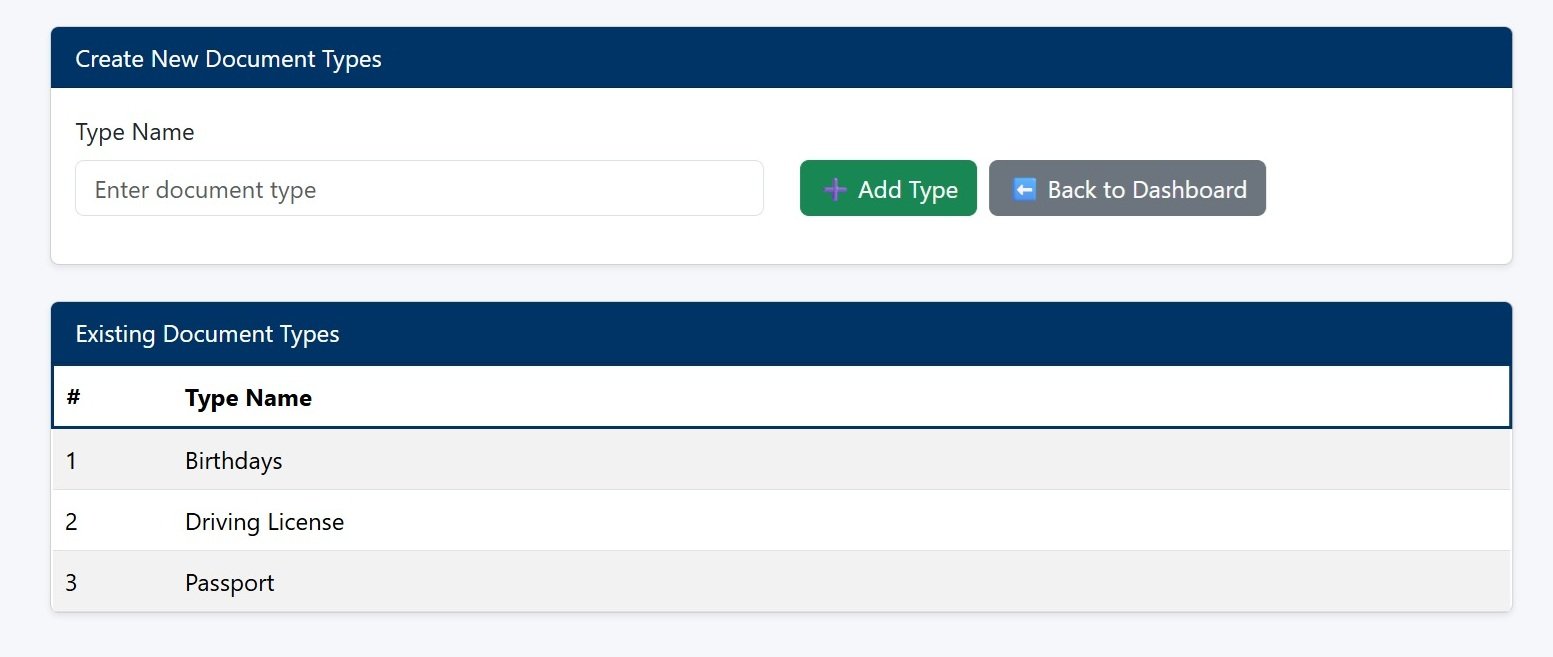
Create Document Types
Creating New Document Types
Customer can create new document types for their requirement other than Driving License and Passport, Example: National ID, Vechicle Insurance, and so on...
Concept of Document Types
  1. Every Documnet will be saved under any one of Document Types.
  2. This will classify the Documents while searching.
  3. Document type max. Limit based on your Package.
✓ Your Benefit
  • Easy to identify Documents, and in reminder email.
  • Easy to update the new expiry date once renewed.
  • You are Categorising the Documents.
GlobalERPfy document expiry management
04
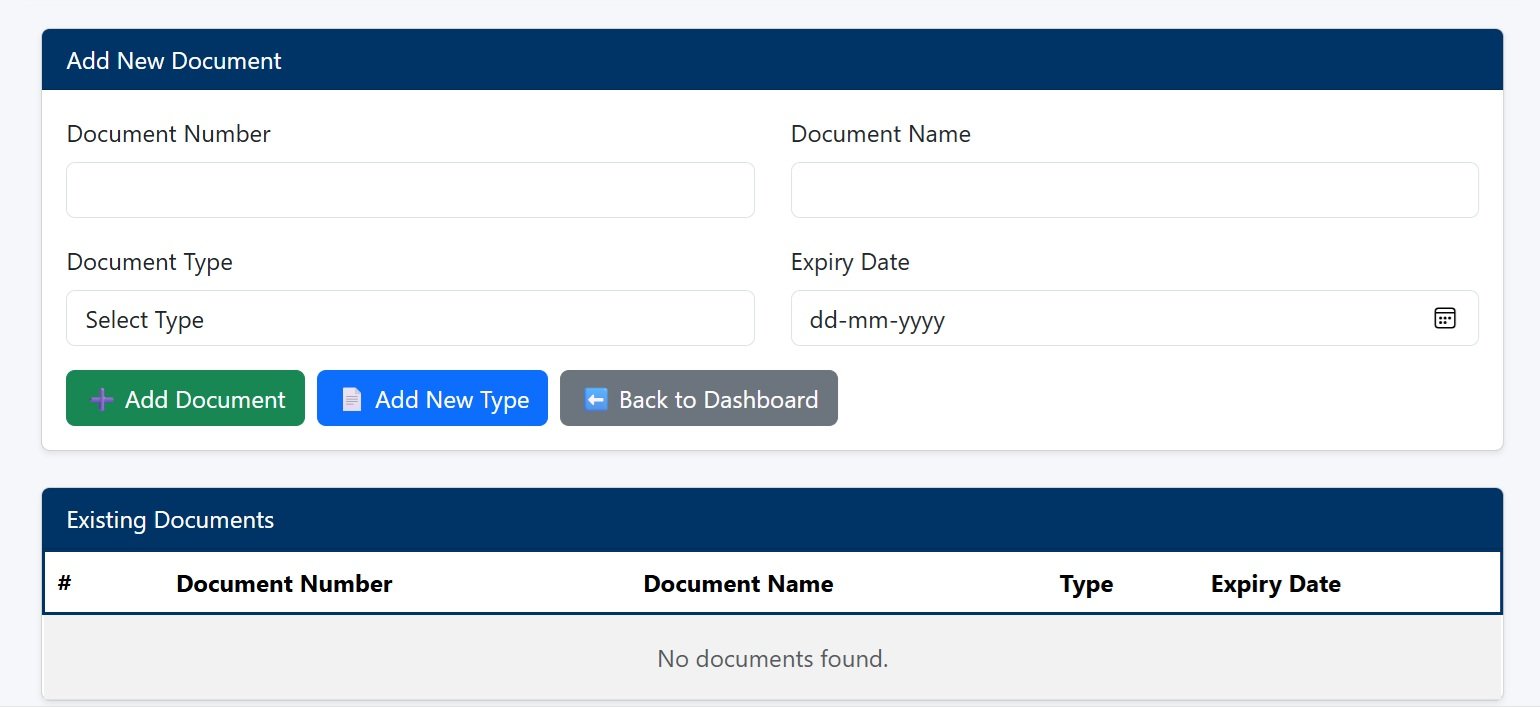
Create New Document Entry
Creating your Documnet with linked type & its expire date.
New Document Can be registered here and Document number unique with respect to the document type. It is available from Documents Menu -> Add Docs.
How to Create New Documents
  1. Enter Document Number & Name
  2. Select the Document Type to assiciate with. If the type not found Click on Add New Type to create.
  3. Enter or select expiry date of your document and Click on Add Document.
✓ Your Benefit
  • Save all your documents at one time.
  • Easily Trackable its Exprity Date.
  • Automatic Email Reminders on 1st and 15th of every Month.
GlobalERPfy automatic document reminders
05
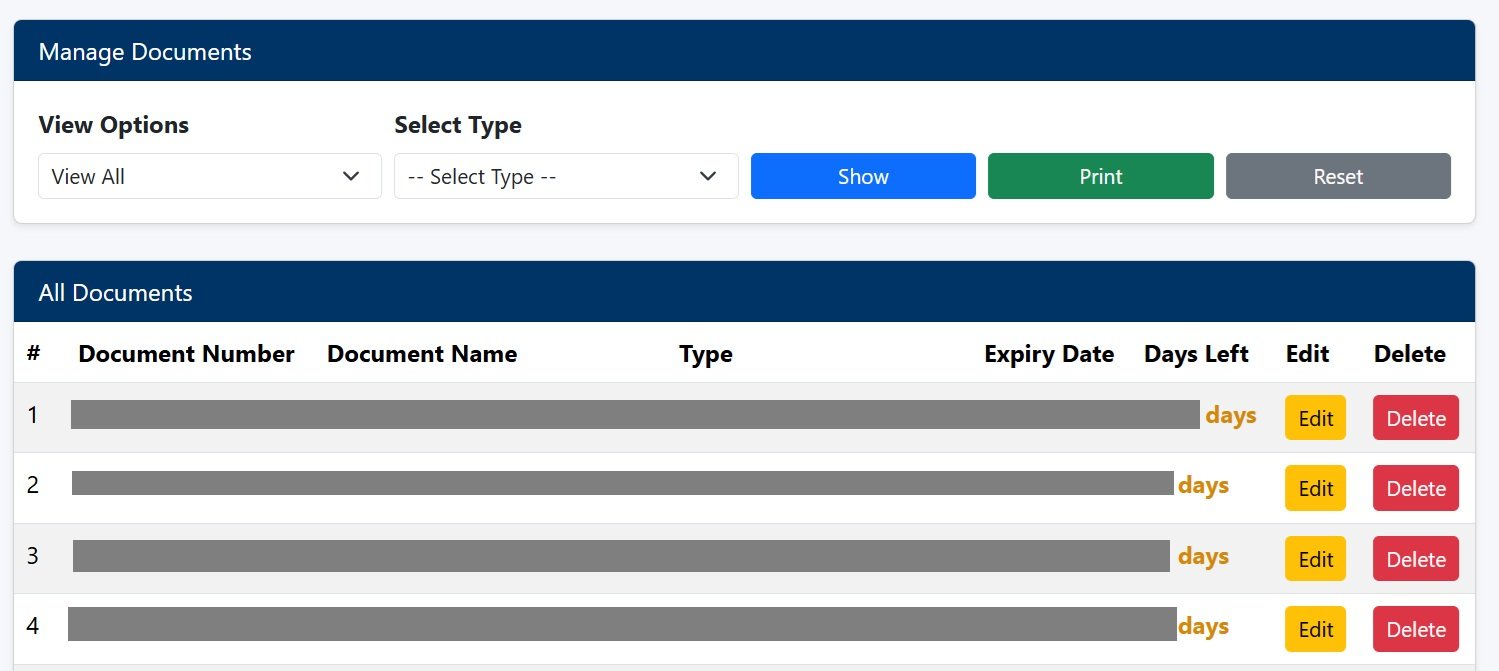
View / Manage Documents
View or Manage your Documents with latest updated
Your documents can be viewed with various option to make your document processing easier and effective approach.
How it works
  1. Select View Option category and or Type, and click show button.
  2. The listed document expiry date can be updted with Edit Button.
  3. If document no longer required, it can be deleted by Delete Button.
  4. All deleted document will be stored in Delected Doc, and can be restored. The deleted docs will be auto deleted permenently in 30 day period.
✓ Your Benefit
  • Document viewing and management.
  • Updating Expiry Date.
  • Delete documents which no longer required.
GlobalERPfy dashboard
06
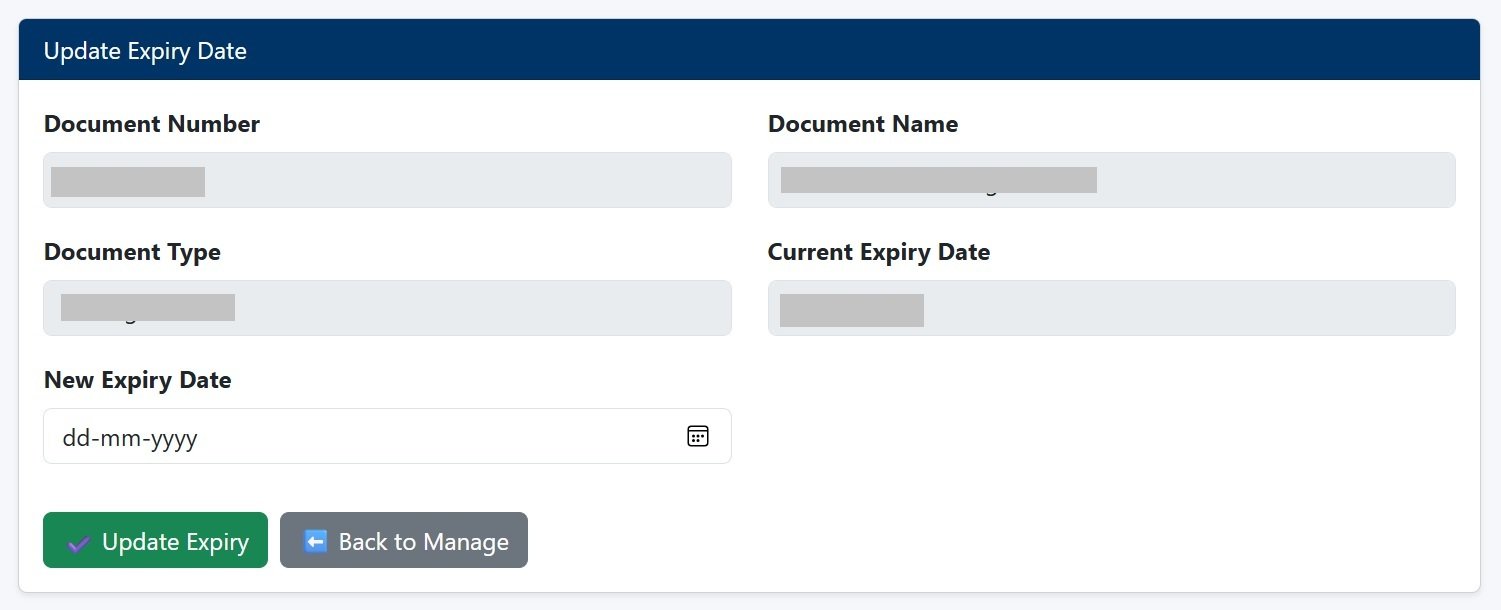
Update Document Exipry
Updating Document Expiry Date once Renewed
Once Renewed, the document new expiry date need to update here. This screen availailable at Documents Menu -> View/Manage Edit option.
How to use
  1. Once a selected document clicked for Edit, update expiry date screen will appear.
  2. Enter or Select the new expiry date and Click on Update Expriry Button to Save Changes.
  3. New Expiry date will be updated.
✓ Your Benefit
  • Updating new expiry date once the document renewed
  • Keep your document always updated.
GlobalERPfy business benefits
07
Get More from GlobalERPfy
A simpler way to manage your business documents
GlobalERPfy is designed to give businesses a convenient digital environment for managing important documents and staying informed about their status.
Make it part of your workflow
  1. Keep your documents updated.
  2. Maintain accurate expiry information.
  3. Review alerts and summaries regularly.
  4. Use the available portal functions to manage your documentation efficiently.
✓ Your Benefit
  • Better organization.
  • Less manual document tracking.
  • Easier access to important records.
  • Improved visibility of document status.
1 / 7